# Dashboards as Code with HCL + SQL

> Now you can visualize your queries, and easily build your own dashboards based on our library of examples.

By Steampipe Team
Published: 2022-03-10


<div className="row mb-5 mt-1">
  <div className="col col-12 col-lg-6">
    <h2>What is Steampipe?</h2>
    &rarr; Query <strong>cloud APIs</strong>.
    <br/>
    &rarr; Visualize queries on <strong>dashboards</strong>.
    <br/>
    &rarr; Run <strong>compliance controls and benchmarks</strong>.
    <br/>
    &rarr; Blazing fast <strong>multi-threaded Golang CLI</strong>.
    <br/> 
    &rarr; Connect anything to the <strong>embedded PostgreSQL</strong>.
  </div>
  <div className="col col-12 col-lg-1"></div>
  <div className="col col-12 col-lg-5 mt-5">
    <Terminal title="steampipe cli">
      <TerminalCommand enableCopyToClipboard={false}>
        {`
select
  region,
  instance_state as state,
  instance_type as type
from
  aws_ec2_instance;
        `}
      </TerminalCommand>
      <TerminalResult>
        {`+-----------+---------+-----------+
| region    | state   | type      |
+-----------+---------+-----------+
| eu-west-1 | running | t3.medium |
| eu-west-2 | running | m5a.large |
| us-east-1 | running | t3.large  |
+-----------+---------+-----------+
        `}
      </TerminalResult>
    </Terminal>
  </div>
</div>

## Introducing Steampipe Dashboards

The Steampipe hub now hosts [plugins](https://hub.steampipe.io/plugins) that map 67 APIs to 1,247 Postgres foreign tables. Things you can do with these tables:

- Query APIs instantly with SQL. 

- Check your infrastructure for compliance with security frameworks.

- Use and extend our vast library of queries, controls, and benchmarks.

- Visualize query results using any Postgres-compatible dashboard: Grafana, Metabase, etc.

Now, with Steampipe Dashboards, you can visualize your queries with Steampipe too. Here's what that looks like.
<video style={{"borderWidth":"thin", "borderStyle":"solid", "width":"100%", "borderColor":"lightgray"}} controls loop>
  <source src="/images/blog/2022-03-release-0-13-0/dashboards-as-code-screencast-v2.mp4" />
</video>

## Dashboards as code

Steampipe [mods](https://hub.steampipe.io/mods) encapsulate named resources, written in HCL, of type `query`, `control`, and `benchmark`. In v0.13 this <i>security-as-code</i> approach expands to include <i>dashboards-as-code</i>. Dashboards use `query` resources too, and with this release we're adding 600 new ones. But dashboards also use new resource types: 


- [Card](https://steampipe.io/docs/reference/mod-resources/card): Show a single value (<i>count of S3 buckets</i>) optionally styled like controls (<i>OK</i>, <i>Alert</i>).

- [Chart](https://steampipe.io/docs/reference/mod-resources/chart): Visualize a query using types `bar`, `column`, `donut`, `line`, `pie`. 

- [Container](https://steampipe.io/docs/reference/mod-resources/container): Group related items and control their layout.

- [Flow](https://steampipe.io/docs/reference/mod-resources/flow): Visualize tree-structured data.

- [Image](https://steampipe.io/docs/reference/mod-resources/image): Show an image from an URL. 

- [Input](https://steampipe.io/docs/reference/mod-resources/input): Receive user input via `select` or `multiselect` widgets.

- [Table](https://steampipe.io/docs/reference/mod-resources/table): Display query results in an HTML table.

- [Text](https://steampipe.io/docs/reference/mod-resources/text): Display Markdown or raw text.

All these components can use static data but, typically and much more powerfully, they can source data from named or inline SQL queries. And when you write dashboards using HCL + SQL, in your favorite code editor, you see results immediately.

<video style={{"borderWidth":"thin", "borderStyle":"solid", "width":"100%", "borderColor":"lightgray"}} controls loop>
  <source src="/images/blog/2022-03-release-0-13-0/live-editing-v2.mp4" />
</video>

## Remixable dashboards

In v0.11 we made mods composable. You can, for example, write a custom mod that refers to resources defined in an existing mod such as [AWS Compliance](https://hub.steampipe.io/mods/turbot/aws_compliance). 

v0.13 extends that model to dashboards. Each type of dashboard component can be used standalone, or as a base element that can be extended with variations. That means you can customize the new dashboard mods we're delivering today, [AWS Insights](https://hub.steampipe.io/mods/turbot/aws_insights) and [OCI Insights](https://hub.steampipe.io/mods/turbot/oci_insights), by cherrypicking and rearranging their charts and tables. And you can augment your custom mods with components that inherit from those we provide, or with new ones you create from scratch.

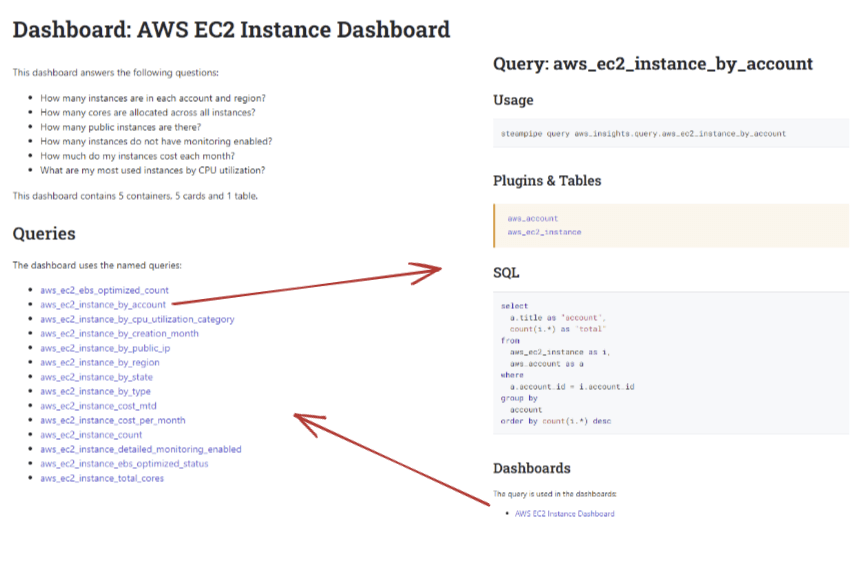
The `AWS Insights` mod, for example, defines 78 dashboards. Our hub documentation list the questions answered by each dashboard, and the queries used to answer those questions. Click on any query to see the plugins and tables it uses, the SQL it runs, and the dashboards that use it. 

<div style={{"borderWidth":"thin", "borderStyle":"solid", "borderColor":"lightgray", "padding":"20px", "width":"70%"}}>
  <img src="/images/blog/2022-03-release-0-13-0/hubdoc-dashboard-and-query.png" />
</div>

## Dashboards for live data

Steampipe isn't a data warehouse or lake. Yes, it embeds Postgres, and you can augment live API queries with data that you cache in tables and views. But Steampipe shines brightest when used to answer the question "What's happening right now?" in complex heterogenous cloud infrastructures. 

An automotive dashboard displays your car's changing environment in realtime. Steampipe queries and controls have always delivered live views of your cloud infrastructure. Now you can visualize that live data on dashboards. 

These code-forward dashboards are ready to participate in the ecosystem of open source IaC tools and components. We provide hundreds of examples for you to use, study, and remix. Give Steampipe Dashboards a try, check out our [tutorial](https://steampipe.io/docs/mods/writing-dashboards) on writing dashboards, tell us what you think, and show us your own dashboards!
## Let’s get building!

Steampipe delivers tools to build, execute, and visualize and share cloud configuration, compliance, and security frameworks using HCL + SQL and a little elbow grease. To support those tools, it maps a growing suite of APIs to tables that you can query, and join across, in Postgres. 

Do you want to help us expand the open source documentation and control coverage for CIS, PCI, HIPAA, and NIST? Add tables to existing plugins? Create plugins to bring new APIs into the mix? Create dashboards to visualize those APIs? The best way to get started is to [join our Slack workspace](https://steampipe.io/community/join) and raise your hand. We would love to talk to you!

For even more good stuff in v0.13.0, check out the [full release notes on GitHub](https://github.com/turbot/steampipe/blob/main/CHANGELOG.md#v0130-2022-03-10).

