# v0.6.0: Export and Filter Controls

> Learn more about the new open source features in Steampipe v0.6.0

By Steampipe Team
Published: 2021-06-17


<div className="row mb-5 mt-1"> 
  <div className="col col-12 col-lg-6">
    <h2>What is Steampipe?</h2>
    <p>Steampipe is <strong>open source software for interrogating your cloud</strong>. Run SQL queries, compliance controls and full governance benchmarks from the comfort of your CLI.</p>
    <p>Steampipe’s codified operations framework gives you the power to <strong>test your cloud resources against security, compliance and cost benchmarks</strong>, and to build your own custom control frameworks. </p>
    <p>Our <strong>multi-threaded Golang CLI</strong> makes your custom SQL controls blazing fast with unlimited integration options via our <strong>embedded PostgreSQL database</strong>.</p>
  </div>
  <div className="col col-12 col-lg-1"></div>
  <div className="col col-12 col-lg-5 mt-5">
    <Terminal title="steampipe cli">
      <TerminalCommand enableCopyToClipboard={false}>
        {`
select 
  region, 
  instance_state as state, 
  instance_type as type
from 
  aws_ec2_instance;
        `}
      </TerminalCommand>
      <TerminalResult>
        {`
+-----------+---------+-----------+
| region    | state   | type      |
+-----------+---------+-----------+
| eu-west-1 | running | t3.medium |
| eu-west-2 | running | m5a.large |
| us-east-1 | running | t3.large  |
+-----------+---------+-----------+
        `}
      </TerminalResult>
    </Terminal>
  </div>
</div>

## tl;dr

** &rarr; ** **[Export control output](#export-control-output)** to CSV or JSON. <br />
** &rarr; ** New **[control filtering options](#control-filter-options)**.  <br />
** &rarr; ** The `query` command now **[supports STDIN](#support-for-stdin)**. <br />
** &rarr; ** **[10 new plugins and mods](#new-plugins-and-mods)**. <br />
** &rarr; ** **[Join our new Slack Channel](https://steampipe.io/community/join)**! <br />
** &rarr; ** Even more goodies in the [full release notes](https://github.com/turbot/steampipe/blob/main/CHANGELOG.md#v060-2021-06-17).

<br />

## Export Control Output
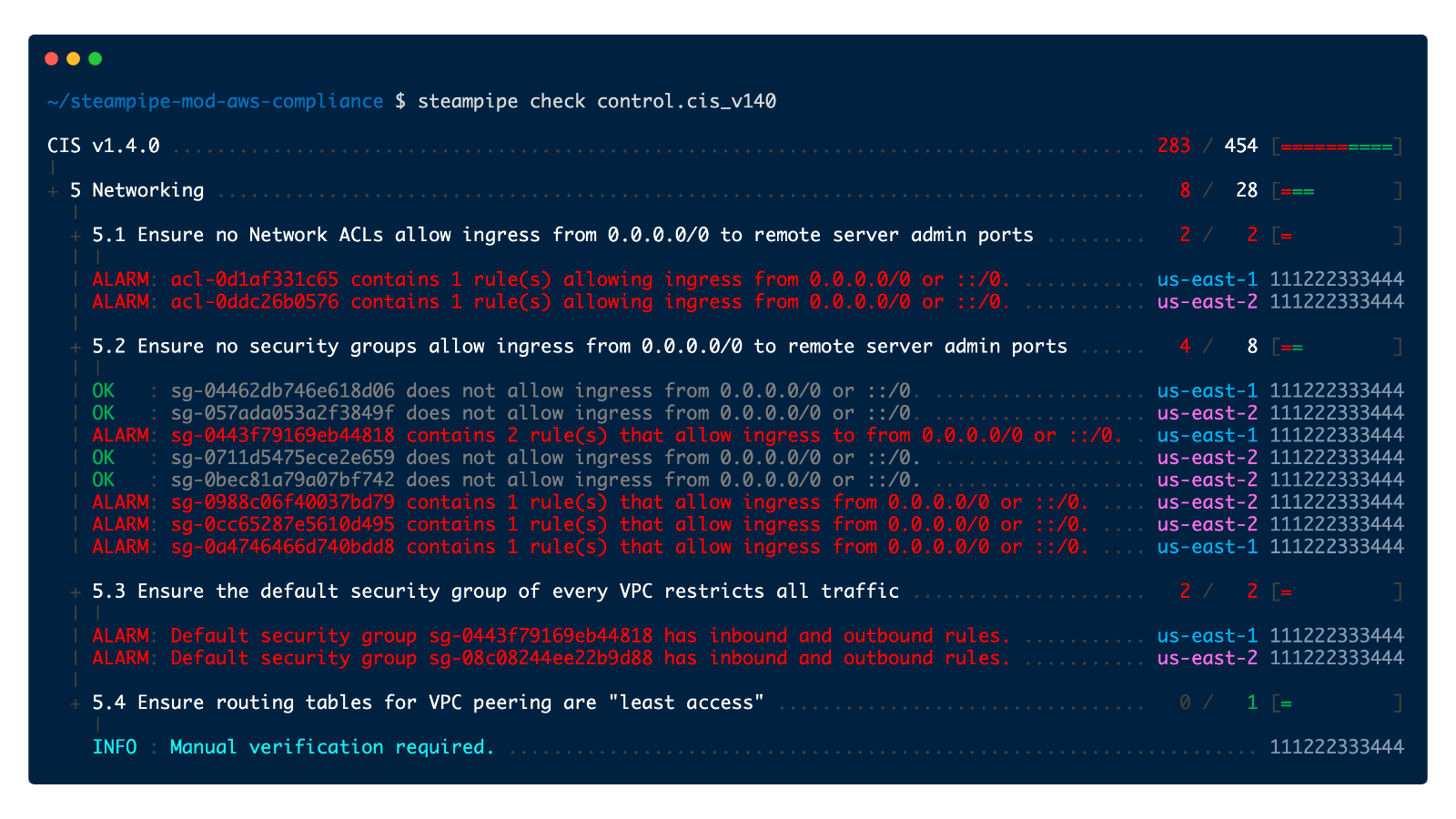
Standard Steampipe queries have always had output options (ascii table format, line format, CSV and JSON).  Last month (in v0.5.0) we added capability to run controls from the cli that output nicely formatted information about the status of each control, like this:

<div className="row mb-4 mt-4 text-center"> 
  <div className="col col-0 col-lg-1"></div>
  <div className="col col-12 col-lg-10">
    <img width="100%" className="center-block" src="/images/blog/aws_cis_v140_console.png" />
  </div>
  <div className="col col-0 col-lg-1"></div>
</div>

This view is awesome for reading by humans, but not so great for parsing via code.  Starting with v0.6.0 we have added the ability to export these reports in CSV and JSON formats. The same control run can be output to the console, and to multiple output formats simultaneously using a new --export command.

<div className="row mb-5 mt-5"> 
  <div className="col col-0 col-lg-1"></div>
  <div className="col col-12 col-md-9">
    <Terminal title="zsh">
      <TerminalCommand withPrompt={false} enableCopyToClipboard={false}>
        {`
$ steampipe check all --export=output.csv --export=output.json
        `}
      </TerminalCommand>
    </Terminal>
  </div>
</div>

## Control filter options

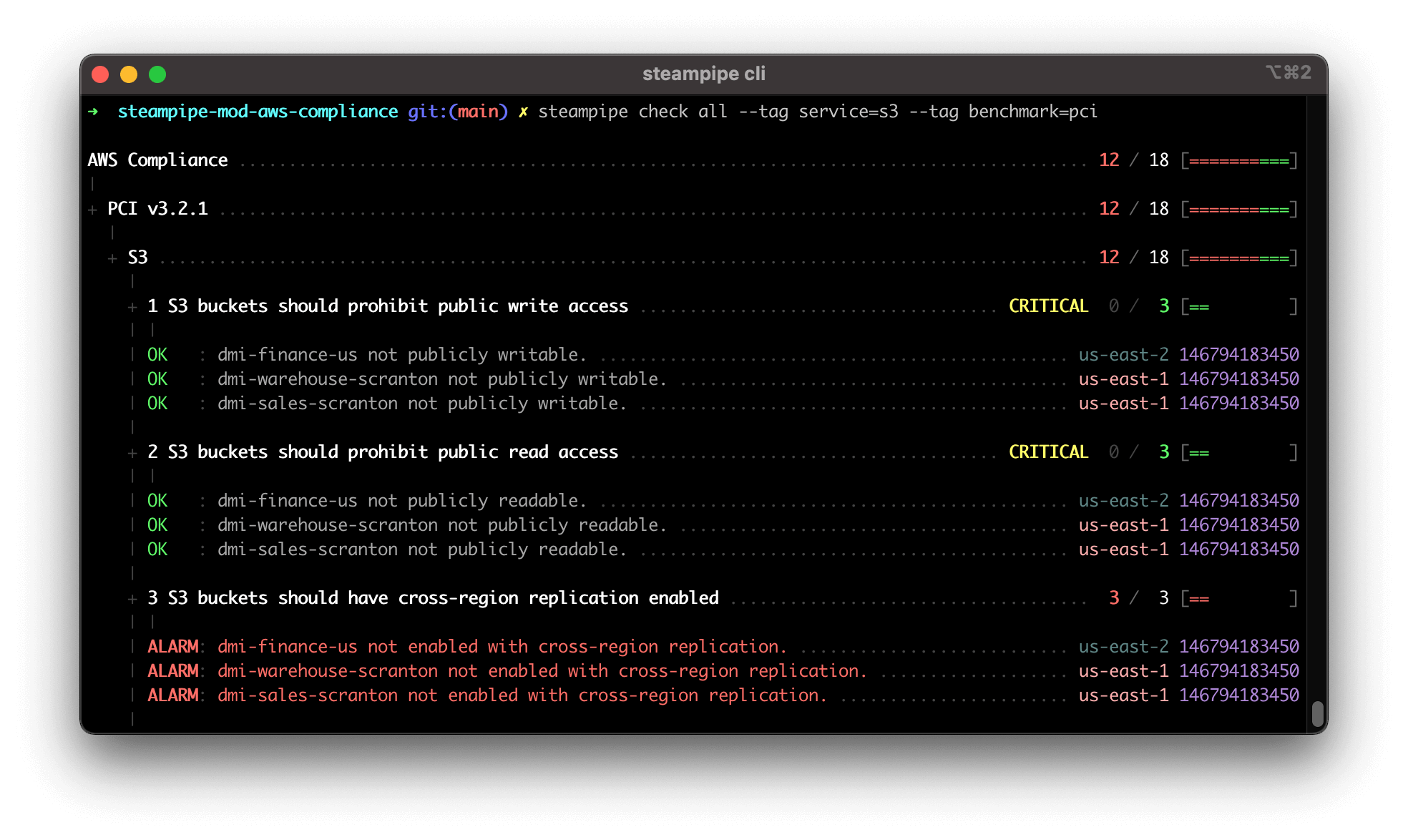
As number of controls in a mod grows larger (the AWS compliance mod [now supports over 300+ controls](https://hub.steampipe.io/mods/turbot/aws_compliance/controls)), it makes sense that we would need capabilities to help manage what controls we run.  New in v0.6.0 you have the ability to use `--tag` and `--where` options when running the `check` command. When using either (or both) of these options, only controls matching **all** of the filters will be run.  In this example we are using tag filtering to run just the PCI DSS controls applicable to AWS S3:

<div className="row mb-4 mt-4 text-center"> 
  <div className="col col-0 col-lg-1"></div>
  <div className="col col-12 col-lg-10">
    <img width="100%" className="center-block" src="/images/blog/check-tag-filter.png" />
  </div>
  <div className="col col-0 col-lg-1"></div>
</div>

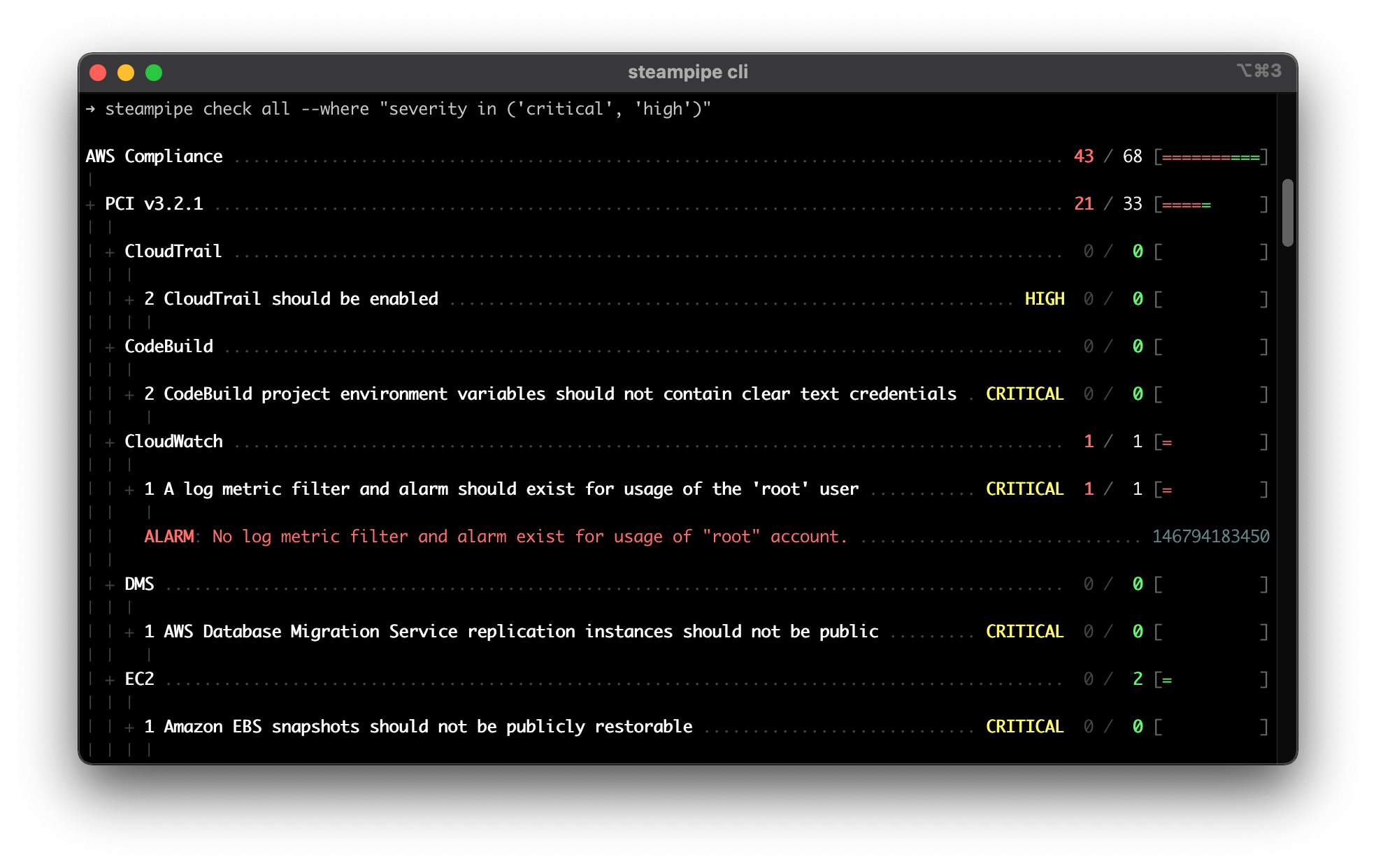
Steampipe's mod introspection allows you to query controls using the `steampipe_control` table. In v0.6.0 you can dynamically pass a `where` clause to the table as another way to limit results.  Here we only run controls that have a `severity` of `critical` or `high`:

<div className="row mb-4 mt-4 text-center"> 
  <div className="col col-0 col-lg-1"></div>
  <div className="col col-12 col-lg-10">
    <img width="100%" className="center-block" src="/images/blog/where-clause-filter.png" />
  </div>
  <div className="col col-0 col-lg-1"></div>
</div>

To help with getting your tag syntax correct the `check` command also supports a `--dry-run` feature that allows you to see what controls would be executed given the current filters: 

<div className="row mb-4 mt-4"> 
  <div className="col col-0 col-lg-1"></div>
  <div className="col col-12 col-lg-9">
    <Terminal title="zsh">
      <TerminalCommand withPrompt={false} enableCopyToClipboard={false}>
        {`
$ steampipe check all --tag service=s3 --tag benchmark=pci --dry-run
        `}
      </TerminalCommand>
          <TerminalResult>
        {`
AWS Compliance
|
+ PCI v3.2.1
  |
  + S3
    |
    + 1 S3 buckets should prohibit public write access
    |
    + 2 S3 buckets should prohibit public read access
    |
    + 3 S3 buckets should have cross-region replication enabled
    |
    + 4 S3 buckets should have server-side encryption enabled
    |
    + 5 S3 buckets should require requests to use Secure Socket Layer
    |
    + 6 S3 Block Public Access setting should be enabled
        `}
      </TerminalResult>
    </Terminal>
  </div>
</div>

## Support for STDIN

The query command in V0.6.0 now supports the ability to read from SDTIN. You can use this feature to pass in a query that was piped from another output, as in this example:

<div className="row mb-4 mt-4"> 
  <div className="col col-0 col-lg-1"></div>
  <div className="col col-12 col-lg-9">
    <Terminal title="zsh">
      <TerminalCommand withPrompt={false} enableCopyToClipboard={false}>
        {`
$ cat my_query.sql | steampipe query
        `}
      </TerminalCommand>
          <TerminalResult>
        {`
+------------------------+-----------+--------------------+
| name                   | region    | versioning_enabled |
+------------------------+-----------+--------------------+
| dmi-warehouse-scranton | us-east-1 | false              |
| dmi-sales-scranton     | us-east-1 | false              |
| dmi-finance-us         | us-east-2 | false              |
+------------------------+-----------+--------------------+
        `}
      </TerminalResult>
    </Terminal>
  </div>
</div>

## New plugins and mods

Since last months v.0.5.0 release there have been 4 new plugins released:
-	[Finance](https://github.com/turbot/steampipe-plugin-finance) - query financial data
-	[Turbot](https://github.com/turbot/steampipe-plugin-turbot) - query Turbot
-	[Vault](https://github.com/theapsgroup/steampipe-plugin-vault) - query Hashicorp Vault
-	[Jira](https://github.com/theapsgroup/steampipe-plugin-jira) - query Jira

Six new mods have been released:
-	[Azure compliance mod](https://github.com/turbot/steampipe-mod-azure-compliance) - CIS
-	[GCP compliance mod](https://github.com/turbot/steampipe-mod-gcp-compliance) — CIS
-	[AWS Thrifty mod](https://github.com/turbot/steampipe-mod-aws-thrifty) — Cost checking
-	[Github Sherlock mod](https://github.com/turbot/steampipe-mod-github-sherlock) - Best Practices
-	[Zoom compliance mod](https://github.com/turbot/steampipe-mod-zoom-compliance) - CIS for Zoom
-	[Alibaba Cloud compliance mod](https://github.com/turbot/steampipe-mod-alicloud-compliance) - CIS

[AWS compliance mod](https://github.com/turbot/steampipe-mod-aws-compliance) has been updated to support even more benchmarks:
-	[CIS v1.4.0 benchmark](https://hub.steampipe.io/mods/turbot/aws_compliance/controls/benchmark.cis_v140)
-	[AWS Foundational Security Best Practices](https://hub.steampipe.io/mods/turbot/aws_compliance/controls/benchmark.foundational_security)
-	[HIPAA](https://hub.steampipe.io/mods/turbot/aws_compliance/controls/benchmark.hipaa)

## Let’s get building!

Steampipe now delivers a full suite of tools to build, execute and share cloud configuration, compliance, and security frameworks using SQL, HCL and a little elbow grease! We would love your help to expand the open source documentation and control coverage for CIS, PCI, HIPAA, NIST… and the best way to get started is to [join our new Slack workspace](https://steampipe.io/community/join) and raise your hand; we would love to talk to you!

For even more good stuff in v0.6.0, checkout the [full release notes on GitHub](https://github.com/turbot/steampipe/blob/main/CHANGELOG.md#v060-2021-06-17).